

- April 10, 2026
- Courtney
- accounting automationAdobe invoice retrievalAI invoice processingAI receipt scanningAI tools for educatorsautomated bookkeepingbank reconciliation softwareChatGPT subscription managementChrome extension invoicingcontent creator softwarecourse creator toolsdigital business automatione-learning platform toolsedtech productivityemail invoice scanningEU invoicing softwarefintech tools 2026freelancer finance toolsGDPR compliant invoicinginvoice automationinvoice management softwareinvoice software review 2026invoice workflow automationL&D toolsmulti-currency reconciliationNotion invoice automationonline course business toolsQuickBooks integrationreceipt automationSaaS subscription trackingSCORM course creatorsolopreneur finance toolsTailride reviewvendor portal automationWhatsApp receipt botXero integration
Tailride Review 2026: Every Invoice From Every Tool, Handled Automatically
You built your course in under an hour.
Now open your inbox. Somewhere in there is a PDF from Adobe, a payment confirmation from your LMS, a usage invoice from your AI tool, and three platform fee summaries you haven’t opened yet.
None of them organized themselves. None of them matched themselves against your bank statement. None of them tagged themselves to the right project.
That’s the part nobody automates. Until now.
Tailride is an AI invoice automation platform built for exactly this: the business behind the creative work. Every subscription you pay for. Every tool in your stack. Every receipt from every conference, co-working space, or freelancer you hired. Collected, extracted, and organized — automatically.
Your Stack Is Bigger Than You Think
Here’s a quick audit. Check off every tool that sends you a monthly invoice:
Notion / Coda / Obsidian
Adobe Creative Cloud
ChatGPT / Claude / Perplexity
Canva Pro
Your LMS (Teachable, Kajabi, Thinkific, or similar)
Email marketing platform
Zoom / Loom
Scheduling tool
Cloud storage (Dropbox, Google One, OneDrive)
Social scheduling platform
Domain and hosting
Meta Ads / Google Ads
Payment processor fees (Stripe, PayPal)
Most creators check 8–12 of these. Each one generates a bill. Each bill arrives differently — PDF attachment, email confirmation, billing portal, downloadable invoice behind a login screen. And every month, someone has to go get them all.
Tailride goes and gets them. Automatically.
How It Works
Email Inbox Scanning
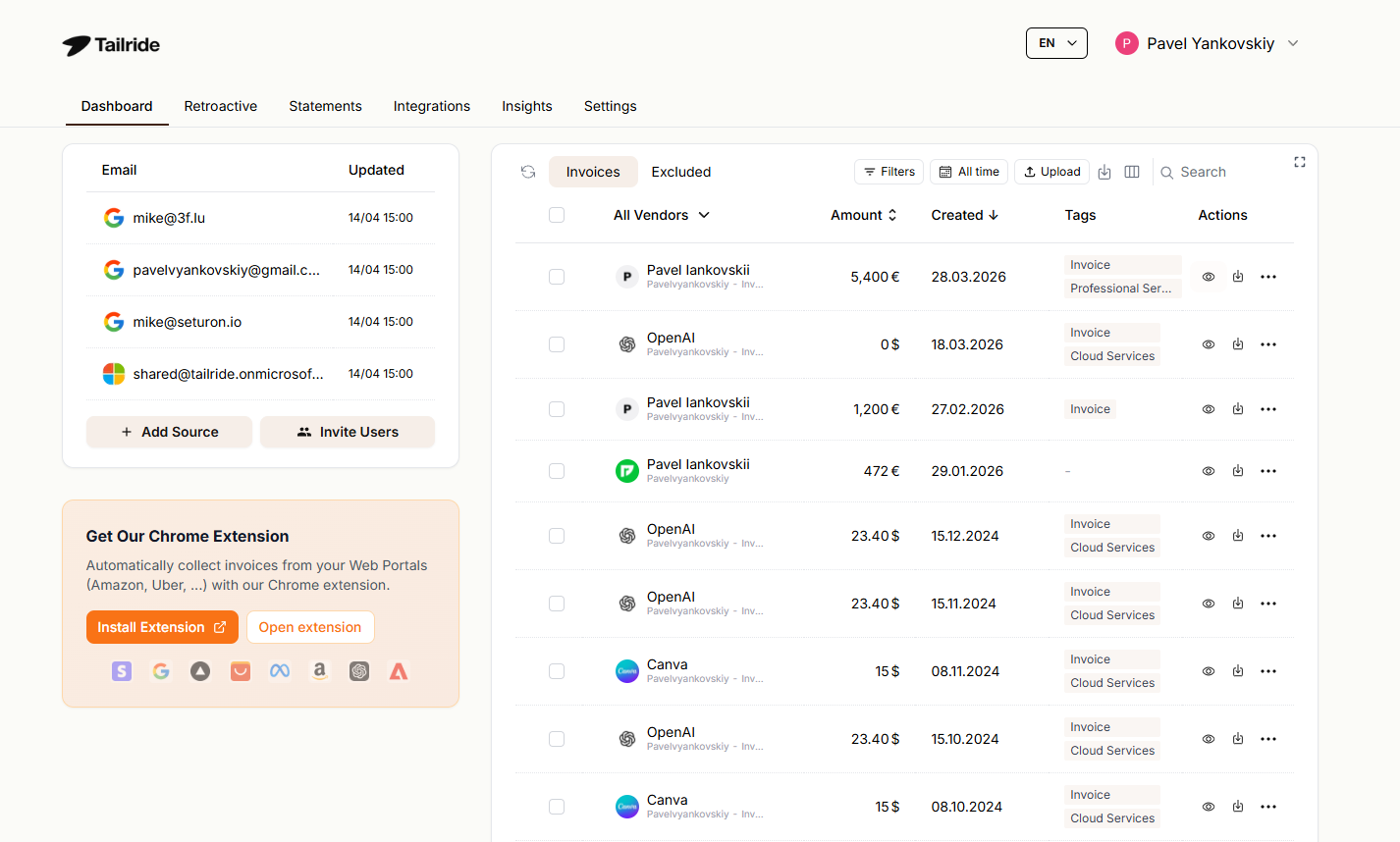
Every tool in your stack has a different billing email. Some land in your main inbox. Some go to a billing alias you check once a month. Some get filtered into a folder you haven’t opened since January.
Tailride connects to all of them simultaneously via OAuth — Gmail, Outlook, or any IMAP account — and scans every hour for new invoices, in every format: PDFs, images, inline email content, and external links. Nothing is forwarded, nothing leaves your inbox. The AI engine processes each document in around 30 seconds with 99.7% accuracy across 50+ languages. Setup takes two minutes.
Portal Retrieval via Chrome Extension
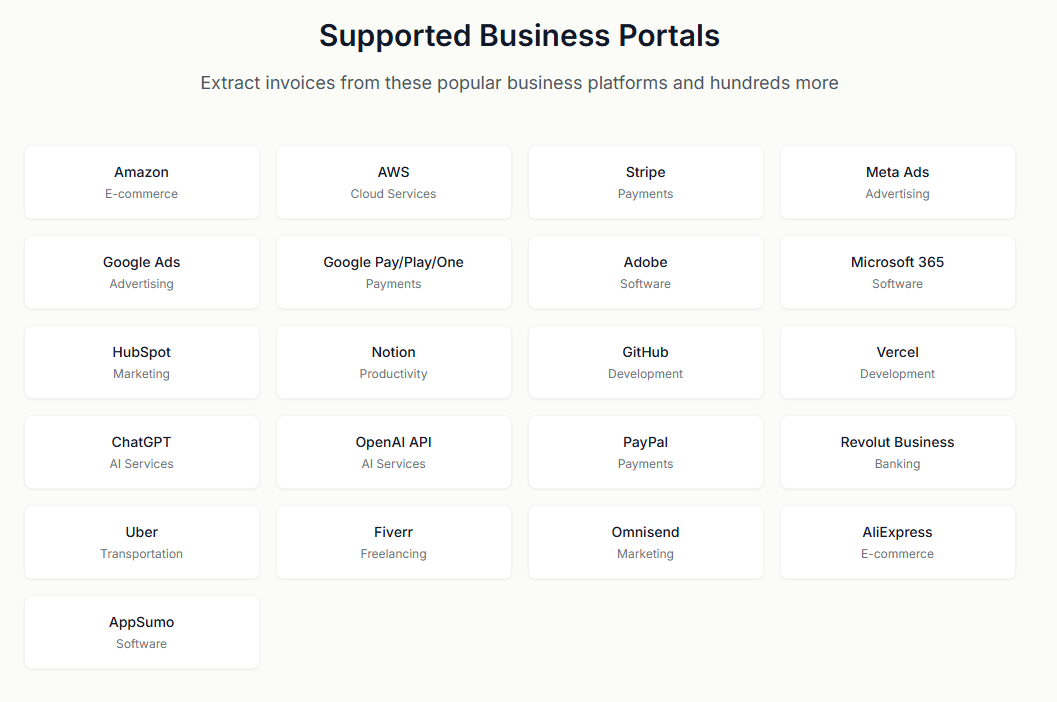
For invoices that don’t arrive by email — locked behind a login screen in a billing portal — Tailride’s Chrome extension retrieves them directly using your existing browser session. Supported portals include Notion, Adobe, ChatGPT, Microsoft, Amazon, Meta Ads, Shopify, and 20+ others. No credentials are ever shared with Tailride. One click per portal, all invoices in your dashboard.
If your LMS sends invoices to your inbox, inbox scanning handles it. If they’re only available in a billing portal, the Chrome extension handles it. Either way, you don’t download a single PDF manually.
For most creators, this single feature replaces 20–30 minutes of monthly portal-hopping. Over a year, that’s half a working day — just on invoice downloads.
Retroactive Scanning
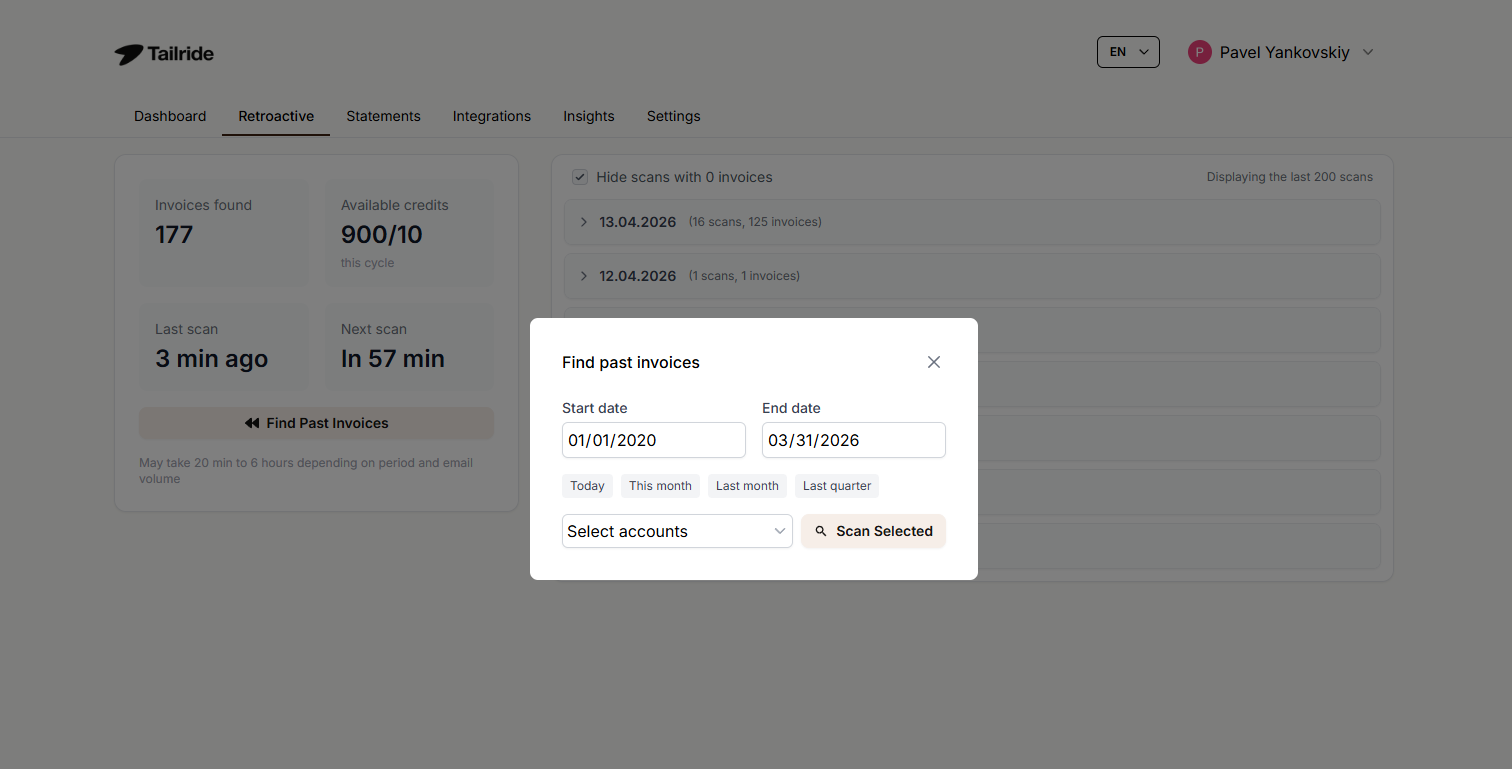
Most creators have changed tools at least twice in the last three years. Every switch left invoices behind — in old inboxes, old portals, old email aliases.
The retroactive scan recovers all of it. Connect your inbox, open the Retroactive tab, hit “Find Past Invoices”, and choose your date range — this year, last year, all time, or a custom window. Tailride processes everything in one automated pass. No limit on how far back it goes. Every invoice from every tool you’ve ever used, recovered in a single session.
WhatsApp and Telegram Receipt Bot
Courses don’t just cost SaaS subscriptions. There’s the ticket to the industry conference. The co-working day when you needed a change of scene. The designer you paid in cash. The equipment you grabbed at a tradeshow.
Photograph any receipt and send it to Tailride’s WhatsApp or Telegram bot. It’s processed in around 30 seconds and lands in your dashboard alongside every email invoice. No app to install. Unlimited users at no extra cost.
AI Processing Rules
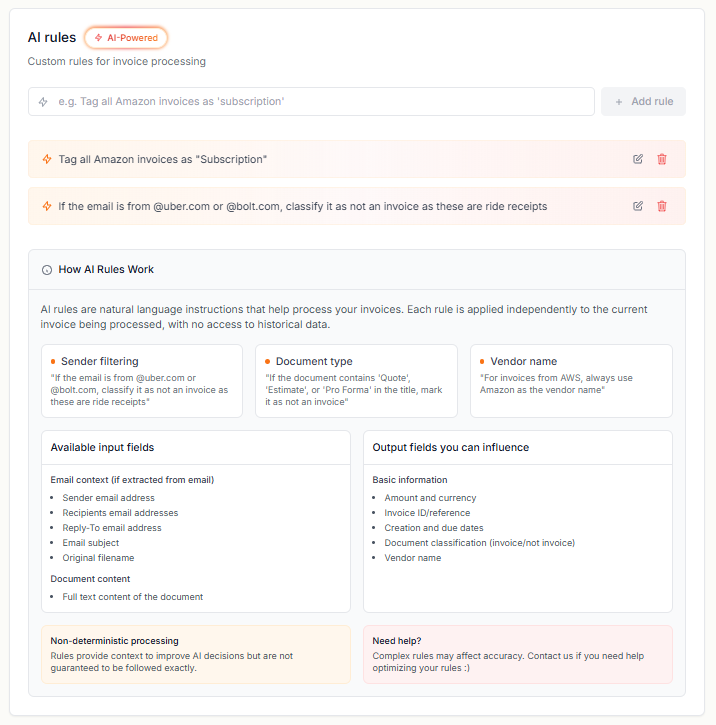
Running multiple courses means multiple revenue streams — and ideally, a clear view of what each one costs to operate.
Set rules once — applied to every future invoice automatically. Tag by tool category (subscriptions, ads, contractors). Assign invoices to specific courses or projects. Set default tax rates per vendor. Override due dates. Filter credit notes from standard invoices. Each rule takes under 5 minutes to configure and runs permanently.
Example: every invoice from Teachable is automatically tagged “Course Platform” and assigned to your current flagship course project — from the moment the rule is set.
Bank Reconciliation
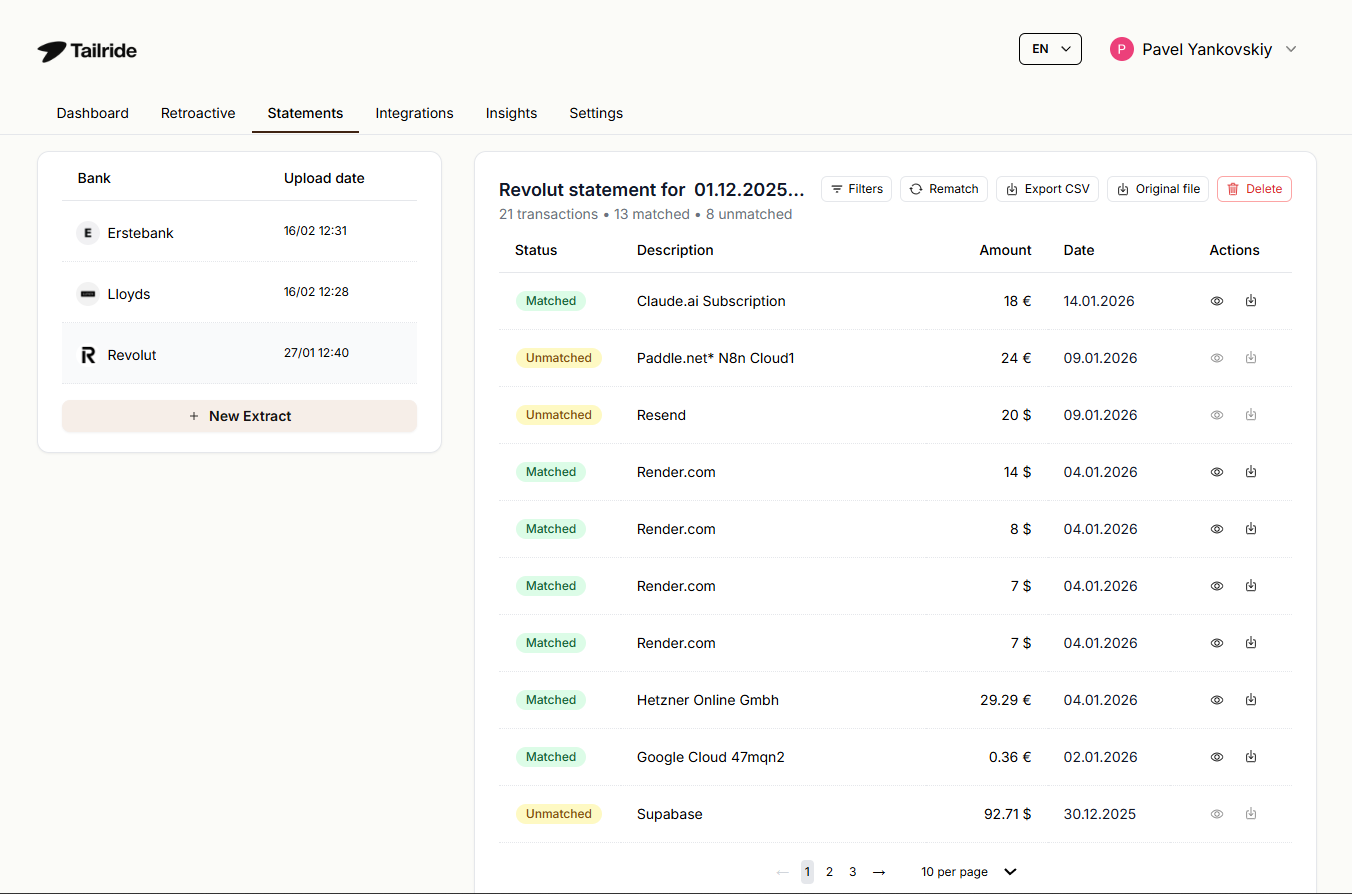
Upload a bank statement — PDF, CSV, OFX/QFX, MT940/MT942, or BAI2. Tailride matches transactions against extracted invoices with a 95% auto-match rate, flags anything missing, and produces audit-ready reports. Full multi-currency support — useful for creators earning in one currency and paying for tools in another.
Integrations
Tailride exports to QuickBooks Online, Xero, Microsoft Business Central, Google Sheets, Google Drive, OneDrive, and DATEV. If you work with an accountant or bookkeeper, Google Sheets export is the fastest way to hand off clean, structured invoice data without any manual formatting.
What It Costs
Free plan: 10 invoices/month, 1 inbox, no credit card. Paid plans start at $13/month (annual billing):
Starter — $13/month: 900 invoices/year, 2 inboxes. Right for most solo creators and small content teams.
Growth — $34/month: 4,200 invoices/year, 8 inboxes. Right for agencies with multiple client accounts and team inboxes.
Scale — $69/month: 9,000 invoices/year, 20 inboxes, 12-hour priority support.
Premium — $138/month: 18,000 invoices/year, unlimited inboxes, 8-hour priority support.
Enterprise — $277/month: 36,000 invoices/year, unlimited inboxes, 8-hour priority support.
Annual billing = 4 months free. First-month credits doubled on monthly plans. Full refund within 3 days. One-time credit bundles available separately — never expire. Full details at tailride.so/pricing.
Frequently Asked Questions
What exactly does Tailride automate?
Everything on the receiving end of your invoicing workflow: finding invoices in your email, retrieving them from vendor portals, extracting structured data, categorizing according to your rules, matching against your bank statement, and exporting to your accounting tool. Set it up once — it runs in the background permanently.
Does Tailride work with tools like Teachable, Kajabi, or Thinkific?
If your LMS sends invoice emails to your inbox — yes, Tailride picks them up automatically via inbox scanning. If invoices are only available inside the platform’s billing portal, check whether it’s supported by the Chrome extension. Portals not yet supported can be requested via Tailride’s feature board.
Can I tag invoices by course or project?
Yes — through AI processing rules. Define a rule (e.g. “all invoices from vendor X → tag Course Launch 2026”) and Tailride applies it automatically to every future invoice matching that condition. Multiple rules can run simultaneously.
Which vendor portals does the Chrome extension support?
Notion, Adobe, ChatGPT, Microsoft, Amazon, Meta Ads, Shopify, and 20+ others. New portals added regularly — users can request specific portals via the feature board.
Does Tailride store my emails?
No emails are stored — Tailride connects via OAuth and reads only to identify invoices. All extracted invoice data is stored in the EU on GDPR-compliant, CASA Tier 2 certified infrastructure. DPA available on request.
I’ve been running my business for 3 years. Can I recover all past invoices?
Yes. The retroactive scan has no limit on how far back it goes. Connect your inbox, trigger the scan, choose “All Time” — every invoice from every tool you’ve ever used, recovered in one session.
What if my team has multiple inboxes?
All paid plans support multiple connected email accounts — from 2 on Starter to unlimited on Premium. Everything lands in one shared dashboard.
Is there a free trial?
The free plan is permanent — not a trial. 10 invoices per month, 1 inbox, no credit card required. Paid features start at $13/month.
Your course is already automated. Now automate the business behind it — start free at tailride.so.


